
Chapter 3: What do you really know about Variables, Data Types and Immutability in JavaScript?

Unlike the prior article, this will be a bit higher level because I want to try and fill a knowledge gap between entry-level and mid-level developers by reteaching some core fundamentals.
This article is part of an ongoing educational series that will be turned into a book and therefore is considered a "living article" subject to change.If you have question, want to contribute or just wanna chat about the content, leave a comment!
If you have a find a bug, typo, DM me on twitter @HansOnConsult.
If you want to contribute to the book, see the GitHub page: https://github.com/HansUXdev/UniversalJavaScript
The goal for this article isn’t to explain everything in JavaScript in overwhelming detail but rather summarize the essentials as plainly as possible and link to other resources for readers who want to explore those topics more thoroughly.
This article will also be treating ES6 as standard JavaScript as it is supported in all modern browsers unless you are supporting an insecure browser like Internet Explorer (which you shouldn’t be). It will also use screenshots for most code examples in order to encourage readers to type it.
In summary, you will learn how to:
Explain
varwith concepts such as hoisting.Explain variable declarations such as
var,letandconstin the context of data-types, scope, and immutability.Identify a variable as either a primitive type or non-primitive data type
Use JavaScript Operators to assign variables and understand data types.
Explain immutability by contrasting variable declarations and their assigned data-types
For experienced JavaScript developers, this article may seem a bit redundant and basic because I’m writing for complete beginners as well. That being said immutability still a confusing topic even for many mid-senior developers and its largely due to a myth that const magically makes things immutable (it doesn’t).
Variables
In general, programming languages have 3 steps for working with variables:
declaration, creating a variable.
assignment, providing a variable with a value.
usage, when the code runs the variable.
Assigning values with Operators
In JavaScript, there are a number of operators, the most commonly used are include Assignment operators, Comparison operators, Arithmetic operators.
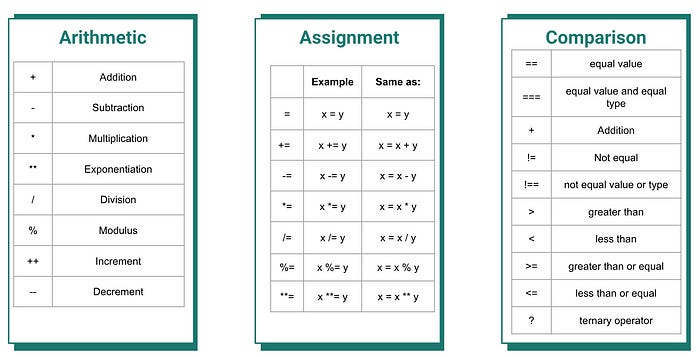
There are however a few others that we won’t be going into such as bitwise, etc.
When learning any new programming language its useful to start out learning variables and specifically the Assignment operators because its how we assign values such as the data type to a variable. After that, working with Comparison operators helps to ease the transition into basic control flow using the ternary operator. Finally, for math, we have the Arithmetic operators and the math object.
Googling how to write various math equations with JavaScript can not only help solve student’s homework but can also be a fun way to learn programming and math in an applied manner… Something I may add, is sorely lacking in educational institutions at all levels.
Here’s an example of using JavaScript functions and arithmetic operators to define a Pythagorean theorem function.
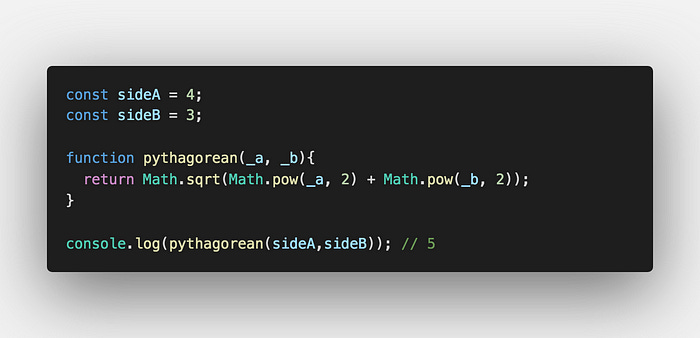
Here we have a simple applied mathematic function using JavaScript. Here we are using JavaScript built-in Math object to get the squared values of sideA and sideB, then using the addition operator we add to them together and get the square root. So (16) + (9) = 25. Then using Math.sqrt(25);//5.
As a Coding Exercise, when you are done reading this article, check out this list of equations and try to write as many of them as simple JavaScript functions.
Hoisting with “var”
As mentioned above, we generally need to declare a variable, then initialize it by assigning it with a value and finally, we use it somewhere. In JavaScript, we can actually skip the first step, declaration and just assign a variable with value then use it in a process called, hoisting. This process is visualized below when var is added to the top, or hoisted to the top.
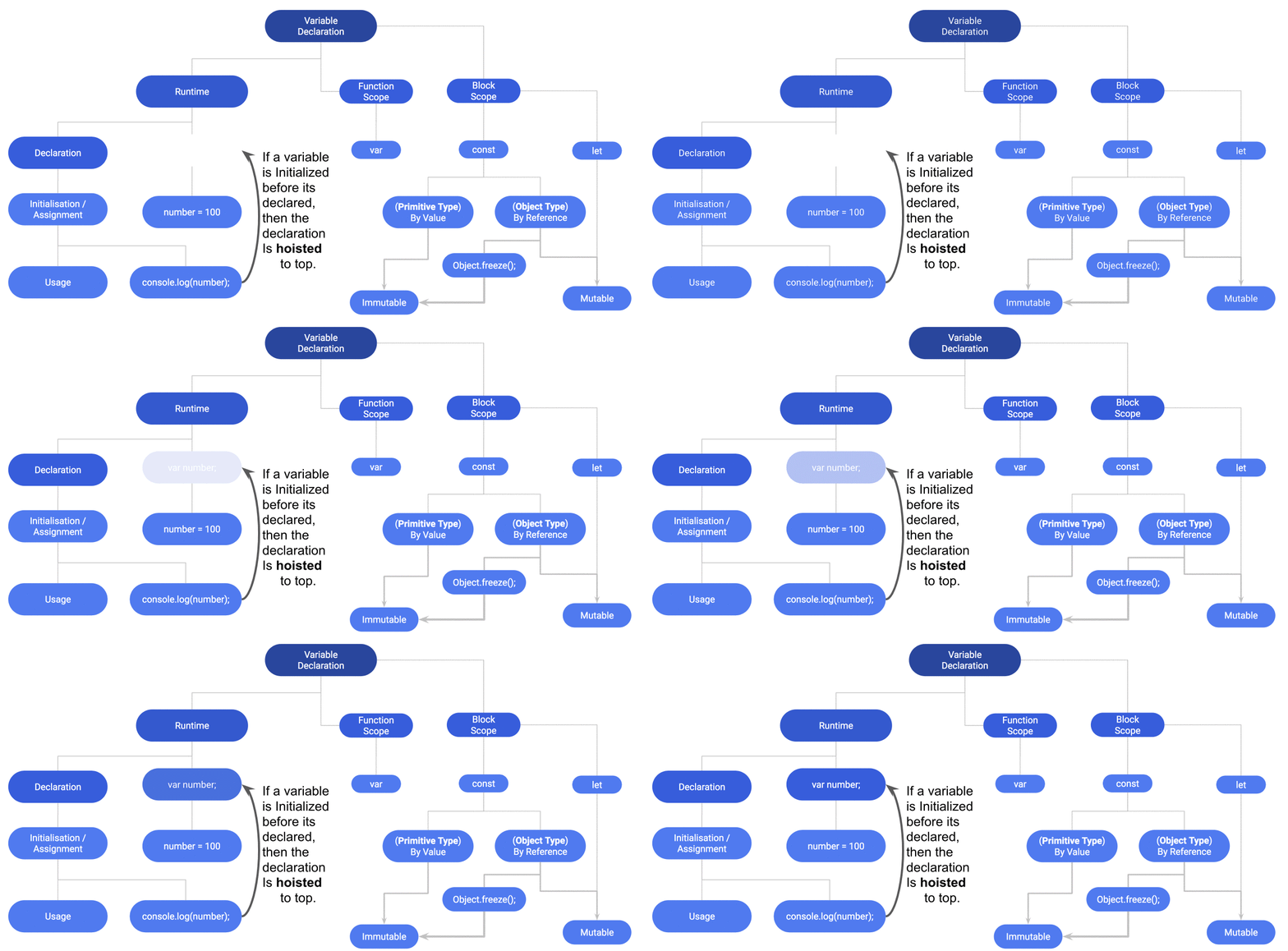
The process of hoisting refers to how the variable declaration is hoisted to the top when the code is compiled for the machine to read it.
Now that we have described the process of creating variables in the context of hoisting, let’s put it into the context of scope and immutability.
There are a few more things I want to quickly point out from the gif:
Hosting only works with
varso it won't hoist a declaration withlet&const, meaning hoisted variables will never be block scoped.In general, you should try and void purposely hoisting variables because it is considered bad practice as it can create global variables that aren’t needed and cause bloated applications
letandconstare both block scope and neither are magically immutable. A variable withconstmust be declared and assigned a value or it will remain empty because the declaration type disables reassignment and throws a type error when you try.“True” immutability happens only when we are working with
const, primitive-types or when we use additional methods to non-primitives such as freeze, seal, etc. This meansvar,letandconstcan all be immutable and the only difference is the scope of the variable and whether or not you can reassign the value.Last but not least is the distinction of
varin a browser vs in a nodeJS environment. Both environments allow hoisting but the global object thatvaris bound to is different. We’ll discuss this more when we go over the scope later in this article.
What is immutability?
Before we discuss immutability lets first off, delete any possible preconceived ideas about const and immutability. It’s about a variable (re)assignment. Immutability is when “an object’s state cannot be modified after it is created” whereas Mutability refers to “an object whose state can be modified after it is created.” There is also a difference between weak immutability and strong immutability.
As a language, JavaScript is by default weakly immutable for two reasons:
Primitives are weakly immutable by default unless
constis used.
What this means is although a primitive value won't change when a method liketoUpperCase();is used, it can be reassigned to a new value, thus weakly mutating it.constsolves this and makes variables unable to be reassigned while also changing the scope.Non-Primitive Objects or basically anything that has a reference value is mutable unless you use
constand other methods such as seal or freeze methods.
We’ll cover this topic more throughout the article but for a more in-depth understanding, I highly reading the following article by Gabriel Lebec:
Four Ways to Immutability in JavaScript
This article presents four different techniques to immutably update data structures in JavaScript: Many of the code…
Variable Declarations
The most important part of variables declaration is how you are managing the scope of variables. In other words, What are you using the variable for? Where will it be used in the application? How should the variable be scoped? Should the value be allowed to change, mutate or be reassigned? Finally, how are you keeping track of and preventing mutations in an application?
Every programming language has different ways of declaring variables. In a dynamically typed language like JavaScript, we declare a variable with var, let and const. The last two variable declarations were part of a 2015 update to the language’s standardization, known as ECMAScript. That, however, is the last time I will use that word and instead I’ll just refer to these parts as modern JavaScript, or simply JavaScript because it has been 5 years and its time to get over the buzz word.
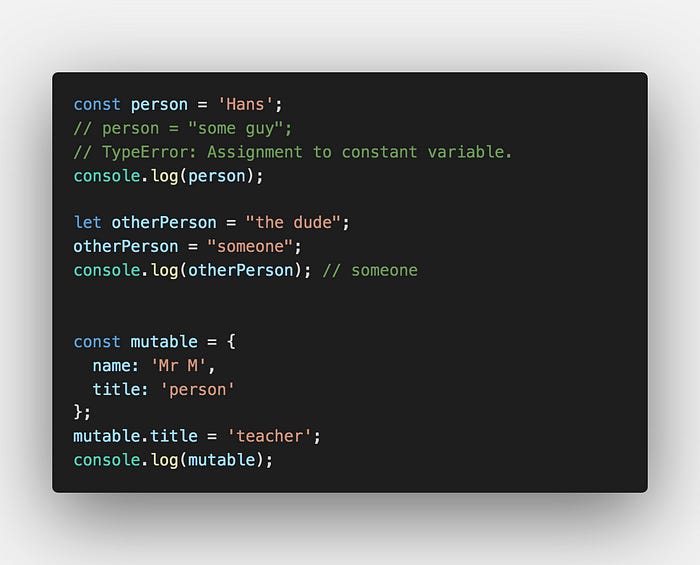
As most people should already know, by now, var is function scoped whereas let & const are blocked scoped and the “tricky part” of const is that it can't be “reassigned” a value or be “redeclared”.
Seems easy enough right?
But wait, if you run the code in the image, why does mutable.title have a value of “teacher” if it cannot be reassigned?
Isn’t
constsupposed to be a constant value? It’s supposed to be immutable too right? That's what this book, certification, article or YouTuber told me.
Hopefully, the books and articles you been reading, the videos you’ve been watching and teachers you’ve had, haven’t led you down the path of misconception. But if so, you are not alone. It happened to me too.
This has actually been a fairly big and ongoing discussion in the JavaScript community and the general consensus is to start with const and move towards let.
So how do we get developers with this misconception back on track?
Who can spot the bug in how immutability was taught?
Well, we didn’t discuss data-types in terms of declaring variables & immutability.
And why would we in a dynamic language? Well, this is exactly why.
In the example above the value wasn’t reassigned but rather the property was mutated. This again, ties into JavaScript being a weakly immutable language. The variable is still an object and objects are mutable unless you explicitly make them immutable with seal or freeze methods.
Data types in Javascript
In JavaScript and other dynamic languages, a variable’s type is determined during the runtime or when the code actually runs/executes. This means that a variable can change after you have assigned it as a primitive or non-primitive.
More specifically, these data types are broken up into two categories, primitive types, and non-primitive types. Understanding each is essential for understanding immutability because primitive types are immutable whereas non-primitives are mutable.
If you hang around with enough JavaScript geeks, you may have heard the following expression:
“everything in JavaScript is an object”
It’s a bit of a cliche but its mostly true because even many of the primitive types are also Standard built-in objects. This is why I choose to use the term, non-primitive instead of “object” which is basically everything and vary confusing too beginners. The diagram below illustrates the data types in each category of primitives and non-primitives.
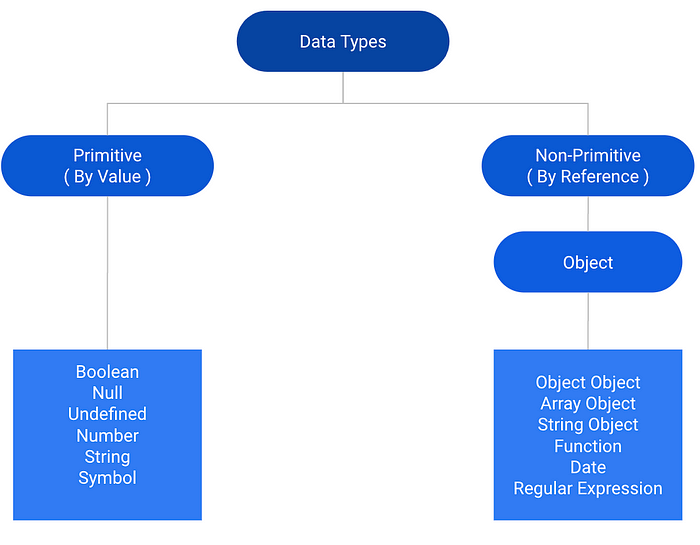
According to MDN, there are seven primitive data types:
Boolean,
trueorfalse.Undefined, no value or an unassigned value.
Number, integer, float, or doubles all fall into one category here.
String, think of this any text value, EX: text you are reading.
Symbol, a newer datatype introduced in 2015. One common use for this is on object properties which we’ll cover in a future article(s).
BigInt, is one of the newest data types introduced in 2020 and is essentially a very large number.
Note that one common point of confusion is that primitive types also have wrapper objects, so there isn’t a “true” string object as the diagram may suggest, but rather there is a temporary “wrapper object” and it is disposed of by the garbage collector after its use.
Next, there are objects or as I refer to them, the six non-primitive data types:
Wrapper Objects are temporary objects created that give primitives access to properties and methods.
Object Object You can declare an object two ways, literally,
let obj = {};or with a constructorlet o = new Object.Array Object, in JavaScript array’s are objects. In laymen terms, you can think of them as a “list”. You can declare an array two ways, literally,
let groceryList = ['Apple', 'Banana'];or with the constructor method,const cars = new Array(“Saab”, “Volvo”, “BMW”);.RegEx or Regular Expressions are “patterns used to match character combinations in strings”.
Function is a wrapper around a code snippet that can be reused, modified, etc.
function foo() { /* code snippet*/ };Date “represents a single moment in time in a platform-independent format.
Dateobjects contain aNumberthat represents milliseconds since 1 January 1970 UTC.”
Exercise: Logging JavaScript Data Types
Logging data types in JavaScript is not a simple task due to unfixed/unfixable bugs as well as confusing semantics to beginners. Even after 5+ years of coding this can still trip up senior developers in unexpected ways.
Generally speaking using using typeof operator is pretty good at checking types however there are some weird caveats. This section is meant to teach these weird bits and also provide a small utility function to help you better log them.
Weird Bits
typeof Array // function
typeof [] // object
The Null Bug
var N = null; N===null // true
null bug — typeof null // object
Steps
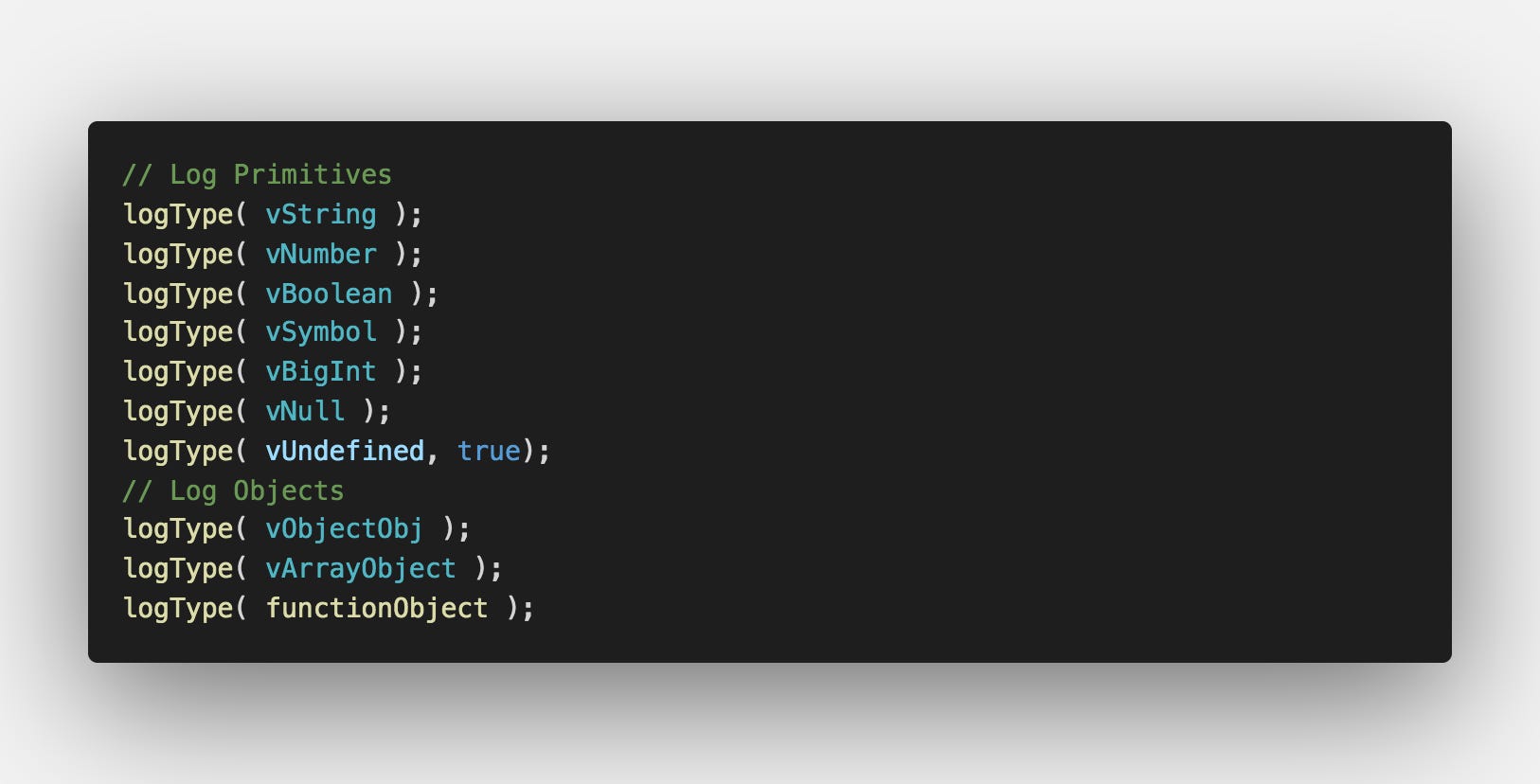
Create 7 variables, each with a different primitive type and create 3 variables and set it them equal to an object, an array, and a function.
Create a function that logs these data types.
Test your function
Step 1: Create 7 variables, each with a different primitive type and create 3 variables and set it them equal to an object, an array, and a function.
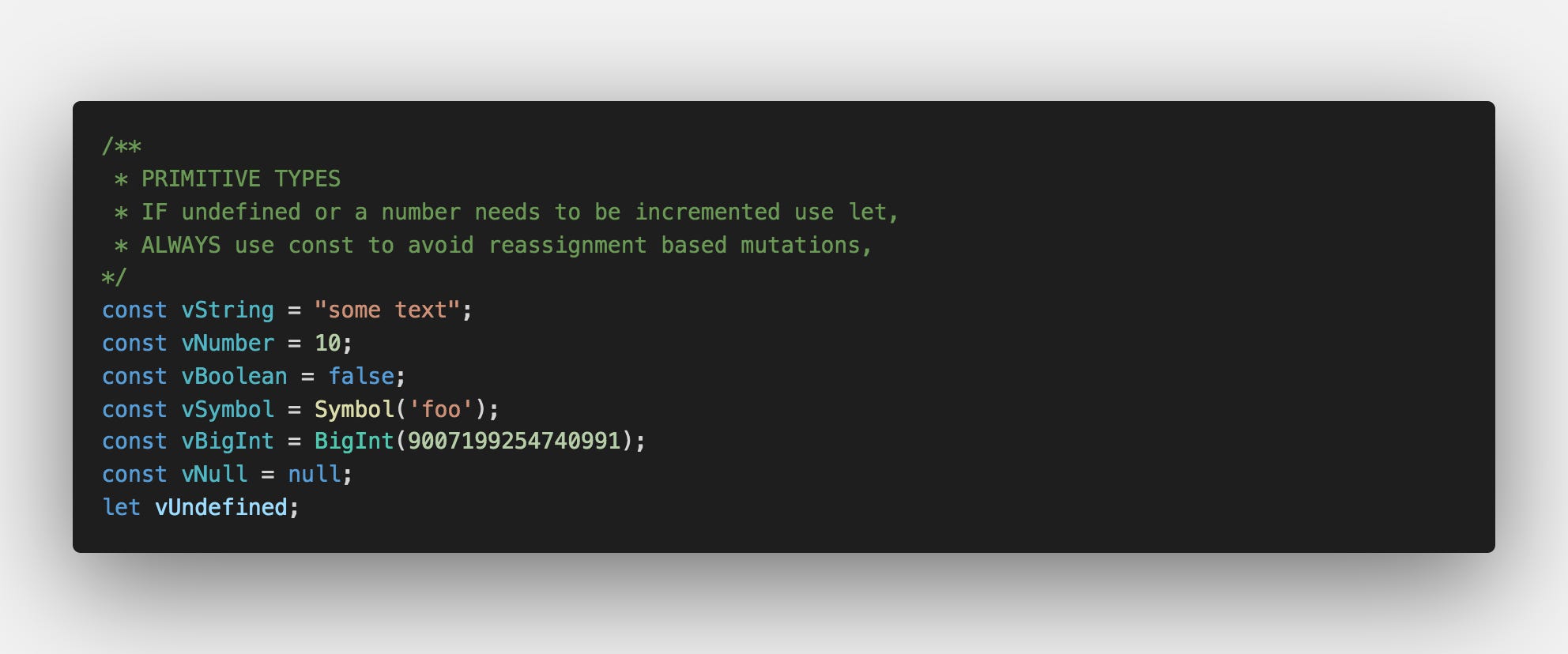
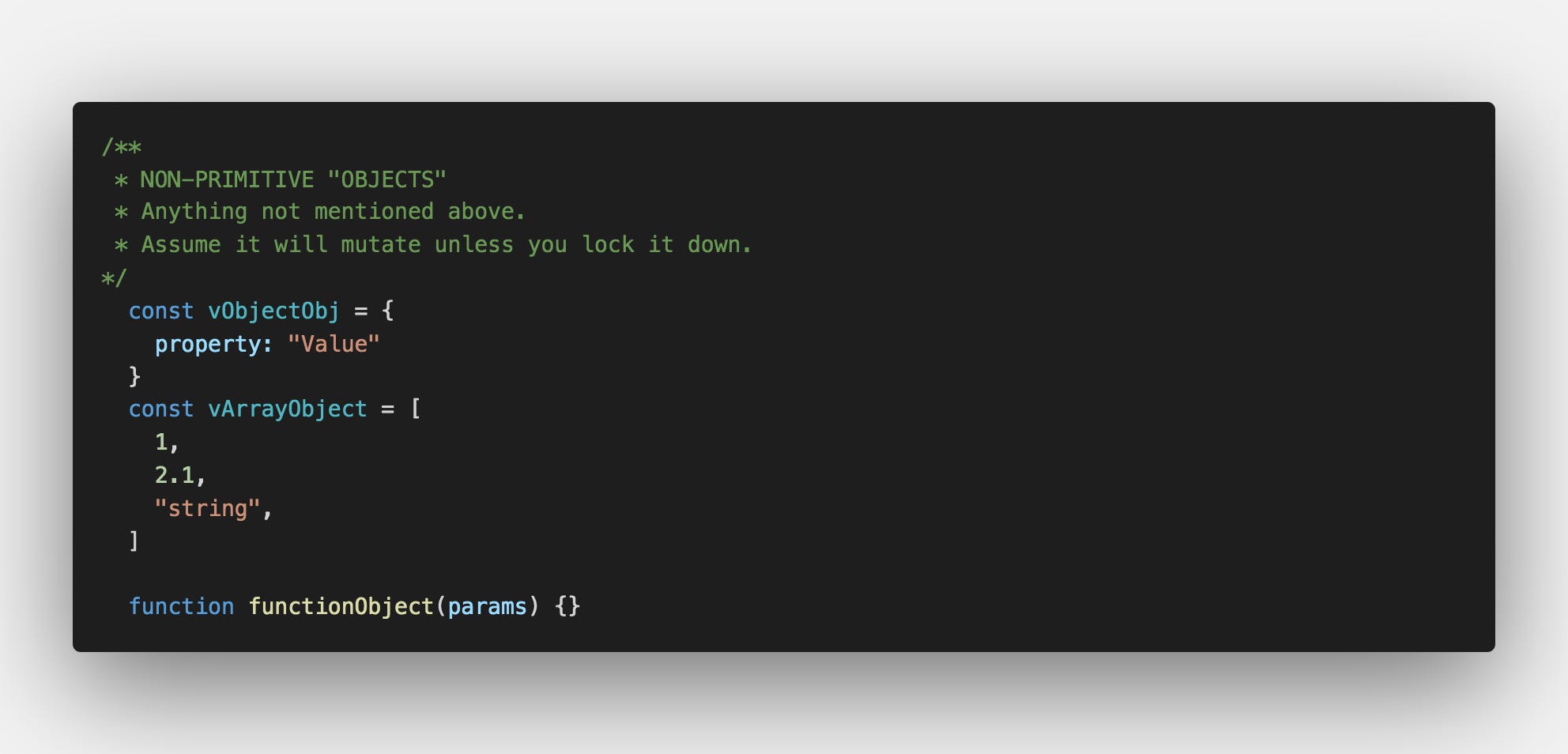
Step 2: Create a function that logs these data types.
Here we use a combination of console.log, console.table, template string, regEx, ternary operators and typeof operator to log the correct data type (even null).
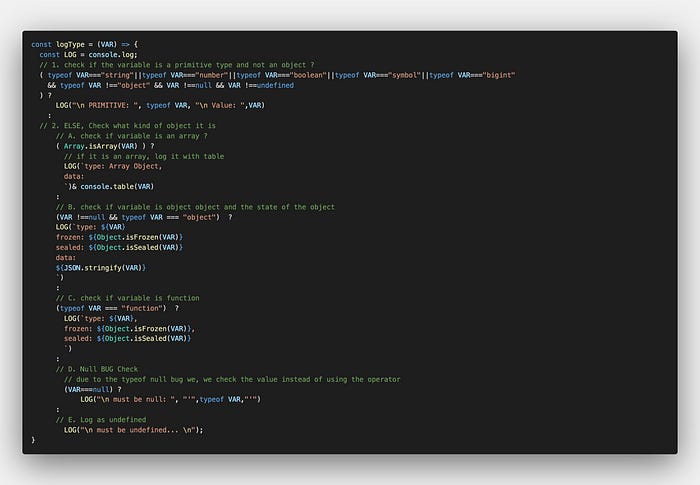
Step 3: Test your function
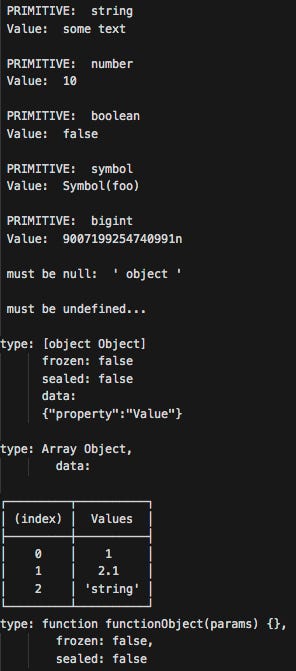
For a more feature rich module logging data types I highly recommend this:
type-inspect
Type Inspector
Further readings the following article(s):
Mathwarehouse doesn’t use JavaScript but it has some great illustrations for understanding data types and especially how memory works with by-value vs by-reference.
Passing by Value vs. by Reference Visual Explanation with animations and diagrams
How memory works A basic knowledge of how memory works and how your variables are stored in memory will help to better…
The following article by Chris Geelhoed does a good job of discussing JavaScript primitives and Object references.
Intermediate JavaScript: What’s the Difference Between Primitive Values and Object References?
A critical distinction between immutable and mutable
Scope in JavaScript
The topic scope in JavaScript is fairly simple when it comes down to it. In JavaScript, the scope can be largely be defined three ways:
Global/module
Local (block and function)
Lexical
Global scope refers to variables available to the whole program or between scripts. Contrary to what some would teach you, var isn’t a “true” global variable because it works slightly differently based on the runtime environment (nodeJS VS browser).
In the browser we have the window object where globals are created by using var or through hoisting:
console.log(window.value); // undefined
value=100;
console.log(window.value); //100
Note that if you are new to JavaScript, this won’t run in nodeJS because there is no window object in nodeJS. Try it out for yourself.
In nodeJS,var is scoped to the module due to closures which is where module scope in nodeJS comes in. Although there is no window object in nodeJS, there is still a Global object and hoisting still works just fine.
The closest example would be the following code:
testContext = 15;
console.log(global);
console.log(global.testContext); // 15
Function scope refers to any variable declared within that function and is only accessible inside that function and any nested functions. var is a function scoped variable declaration.
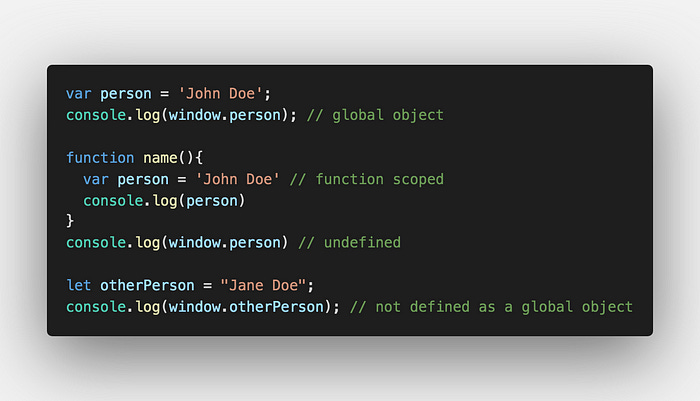
Note that var is bound to the window object and can be logged as a property.
let on the other hand is block scoped and even outside the curly braces still isn’t bound to window.
Block scope refers to variables available to the block, or curly braces {}, it is defined in. const and let variables are both block-scoped variable declarations.
However, const reserves the word within the block scope so it cannot be reassigned.
When const is used with a primitive type it’s immutable because it can never change, even through reassignment.
However, non-primitives are still mutable like we demonstrated in the very beginning when we used objects. This also applies to arrays so you may want to read up on mutating vs non-mutating array methods.
JavaScript Array Methods: Mutating vs. Non-Mutating
JavaScript offers several ways to add, remove, and replace items in an array - but some of these ways mutate the array…
Lexical scope is a bit difficult to define simply and honestly should be in its own article. The simplest definition of lexical scope according to google is:
“a variable defined outside a function can be accessible inside another function defined after the variable declaration. But the opposite is not true, the variables defined inside a function will not be accessible outside that function.”
To understand it you’ll need to understand closures and this. The latter concept is probably the single most confusing and awkwardly named concept in the entire language. Below are a few youtube videos that can help you understand the lexical scope and everything else scope related in JavaScript.
Hoisting, Scope, Closures, and Lexical Scope
THIS and Lexical Scope
Shub‘’ five use cases of this:
1. Function Invokation
(1:28)
2. Method Calls on Objects (1:56)
3. “new” keyword
(2:55)
4. Explicit Binding
(3:25)
5. Arrow Functions
(4:00)
THIS in Classes
Finally, one more advanced point of use of thethis keyword is introduced when developers start using JavaScript Classes. The topic of class often leads to confusion and tends to be especially common when developers come from strongly typed, Object-Oriented Programming (OOP) languages like C#.
Though many OOP concepts are comparable, sometimes it’s still like comparing a word that only exists in Chinese and trying to translate it into literal English. Classes are the perfect example because they are a loan word from OOP languages and in JavaScript the inheritence model is based on prototypes instead of true OOP inheritance so
thisis a bit more tricky to deal with.
To learn more about using classes with the this keyword, I recommend checking out this article written by Michael Krasnov. You don’t have to actually avoid using JavaScript classes, but rather understanding how and when to use it compared JS objects and prototype delegation will serve you well as you learn JavaScript.
Please stop using Classes in JavaScript and become a better developer
In this article I will talk about why it is a bad idea to use classes in JavaScript, and what are some of the…
Conclusion
We covered a lot in this article. I hope it helped clarify some common misconceptions and provide you with additional resources to learn beyond the article. Now go ahead and test your knowledge with today’s post-assessment.
Please don’t be discouraged if you don’t do well on the post-assessment, it goes fast so a lot people miss question they know. All it means there is more room for you to grow in terms of speed.
I’m also introducing an expert post-assessment. Fair warning, its pretty challenging, and the last two questions tripped up mid and senior developers from at larges companies such as Choice Hotels, and Keap so try out the quiz if you want more of a challenge. I’ve adjusted it since but whether you are a beginner, or an experienced developer don’t beat yourself up over the assessments.